TL;DR
- Railway if you want to ship fast and never think about infrastructure. Git push, it works, done. You'll pay more for the convenience.
- Fly.io if you need global users, lower costs at scale, or infrastructure control. More work upfront, but cheaper long-term and better for distributed apps.
- Railway's "$5/month" plan actually costs $15-30/month for any real always-on app with a database. Budget accordingly.
- Fly.io's Postgres is not a managed database. It's a VM with Postgres on it. If you don't configure backups yourself, you will lose data eventually.
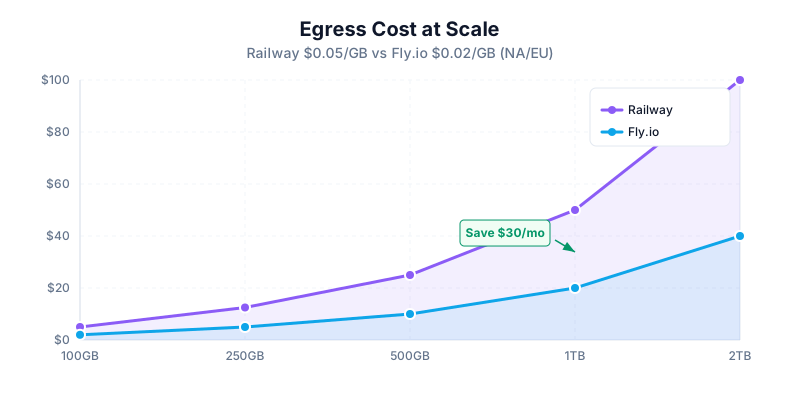
- At 1TB/month egress, Fly.io saves you $30/month over Railway ($0.02/GB vs $0.05/GB). The gap is smaller than it used to be thanks to Railway Metal.
Introduction
You push your side project to Railway at 11pm. It's live in 90 seconds. You go to bed happy. Three weeks later you get a $37 bill and realize "usage-based" means something very specific.
That's the Railway vs Fly.io decision in a nutshell. One platform optimizes for getting you deployed as fast as possible. The other gives you the controls to run infrastructure the way you want. Both are solid Heroku successors, but they make very different trade-offs.
This comparison isn't a feature checklist. It's what you learn after running apps on both platforms: the billing surprises, the deployment friction, the database gotchas, the scaling walls you hit at different stages. Last updated April 2026 with Railway Metal pricing and Fly.io's region consolidation. If you're a solo developer, an indie hacker, or a small team (2-10 people) shipping a Node/Python/Go backend with a database and moderate traffic, this is for you.
Railway vs Fly.io at a glance
| Feature | Railway | Fly.io |
|---|---|---|
| Deploy time (new user) | ~2 minutes (git push, done) | ~15-25 minutes (CLI + Dockerfile + fly.toml) |
| Config files required | None for most languages | fly.toml + Dockerfile (effectively mandatory) |
| Regions | 4 (US West, US East, EU West, Southeast Asia) | 18 globally |
| Multi-region support | Limited (config-as-code) | Yes, with anycast routing |
| Autoscaling | Horizontal via replicas | Concurrency-based autoscaling native |
| Managed Postgres | Yes, with automatic backups and auto-injected connection strings | No, it's a Postgres VM you manage yourself |
| SSH access to containers | No | Yes (fly ssh console) |
| Free tier (2026) | Trial only, $5 one-time credit | No free tier, 2 VM-hour trial, then pay-as-you-go |
| Real cost: web app + Postgres 24/7 | $15-30/month | $7-15/month |
| Egress pricing | $0.05/GB | $0.02/GB (NA/EU), $0.04/GB (APAC), $0.12/GB (Africa/India) |
| Scale to zero | Yes | Yes (Fly Machines) |
| Private networking | Project-scoped internal hostnames | WireGuard-based 6PN across all regions |
Railway vs Fly.io pricing and real costs
Both platforms look cheap on the landing page but behave very differently in production. This is the part most likely to surprise you, so it goes first.
Railway's pricing reality
Railway charges a $5/month Hobby plan fee that includes $5 of usage credits. Sounds like $5/month, right? It's not.
A single web service (1 vCPU, 512MB RAM) running 24/7 costs roughly $10/month in compute alone ($20/vCPU/month + $10/GB RAM/month). Add a Postgres volume and you're at $12-15/month. That's before egress. A real persistent app on the Hobby plan lands between $15-30/month, and this is the most common complaint on Railway's subreddit and Discord.
The Pro plan ($20/month, with $20 of usage credits included) removes Hobby-tier limits and goes up to 1,000 vCPU and 1 TB RAM per service. A small production app on Pro typically runs $35-55/month total.
There's also a Trial plan with a one-time $5 credit, enough to test deployments but not to run anything persistent.
The scarier part: runaway processes can generate real charges. A logging loop or misconfigured cron racks up costs before you notice. Railway sends usage warnings, but the Hobby plan's resource caps (48 vCPU, 48 GB RAM) do provide a natural ceiling.
Worth noting: Railway moved to its own bare-metal infrastructure (Railway Metal) in 2025, which cut egress costs to $0.05/GB. That's a big improvement over earlier pricing.
Fly.io's pricing reality
Fly.io no longer has a free tier. In October 2024, they removed free allowances for new customers and switched to pure pay-as-you-go. New signups get a brief trial (2 VM-hours or 7 days, whichever comes first), then need a credit card. Legacy users on old Hobby/Launch/Scale plans keep their allowances.
Billing is per VM-second. A shared-1x VM (1 shared CPU, 256MB) costs about $2.02/month always-on. A shared-2x (2 shared CPU, 512MB) runs ~$4.04/month. Fly Postgres on a shared-1x with 1GB volume: $3-5/month.
The catch: VMs are billed when allocated, not when serving traffic. A "stopped" machine still costs money for rootfs storage ($0.15/GB/month). Volume snapshots, now enabled by default on new volumes since January 2026, are charged at $0.08/GB/month (first 10GB free).
Egress pricing varies by region: $0.02/GB in North America and Europe, $0.04/GB in Asia Pacific/Oceania/South America, and $0.12/GB in Africa and India.
Side-by-side cost breakdown
| Usage level | Railway | Fly.io |
|---|---|---|
| Hobby / side project | $15-25/month (Hobby plan + 24/7 web + Postgres) | $7-12/month (pay-as-you-go, no free tier) |
| Small production app (1 service, Postgres, 50GB egress) | $35-55/month (Pro plan) | $15-25/month |
| Growth (3-4 services, Redis, Postgres, 500GB egress) | $80-140/month | $40-70/month |
| 1TB egress alone | $50 | $20 (NA/EU) |
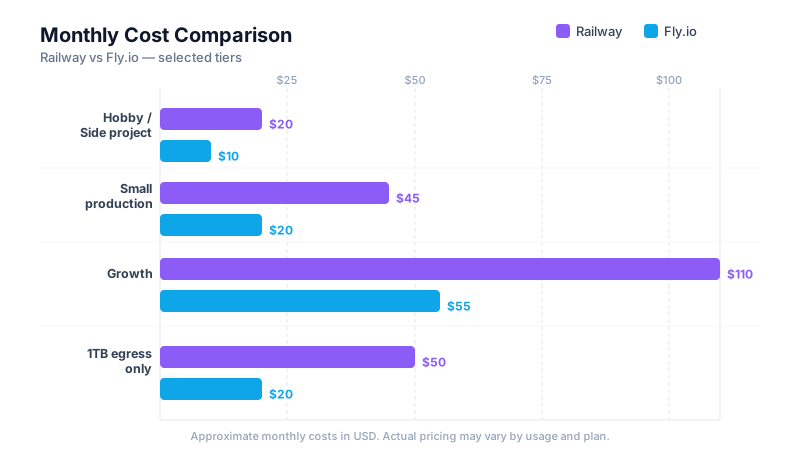
Fly.io wins on raw cost for always-on production services, though the gap narrowed after Railway Metal brought egress down to $0.05/GB. Neither platform offers a real free tier anymore. If you're cost-sensitive, run the numbers on egress first. That $0.03/GB difference still adds up at scale.
Developer experience and deployment simplicity
For small teams, the hours you spend configuring infrastructure often cost more than the hosting bill. This is where the two platforms diverge the most.
Railway: git push and it works
Railway is the closest thing to "push and forget" that exists in 2026. Connect your GitHub repo, and Nixpacks auto-detects your language and builds your app. No Dockerfile needed for Node, Python, Ruby, Go, Rust, or PHP. Add a Postgres plugin and DATABASE_URL gets injected into your environment automatically. Deploy time from push to live: 60-120 seconds for a typical Node.js app.
The dashboard is polished. Real-time deploy logs, per-service metrics, one-click rollbacks, branch preview environments. The CLI (railway up) deploys in seconds with zero config files.
The trade-off: you get less control. You can't pick instance types, CPU architecture, or kernel parameters. Nixpacks edge cases (non-standard build steps, monorepo setups) can be frustrating to debug. Multi-region support exists via config-as-code but is limited compared to Fly.io.
Fly.io: more setup, more control
Fly.io requires installing flyctl, writing a Dockerfile (effectively mandatory; buildpack support exists but is unreliable), and configuring a fly.toml file. First deploy for a new user: 15-25 minutes even if you know what you're doing.
But that fly.toml file is where the trade-off pays off. It's version-controllable and explicit: 30+ configuration keys covering VM size, health checks, concurrency thresholds, scaling behavior, and multi-region deployment. No magic. You know exactly what's deployed because you wrote it down.
The web dashboard is minimal. Most operations require the CLI, which creates a real barrier for less technical teammates who need to check logs or trigger a deploy.
The most common stumbling block: health check misconfiguration. If your app takes longer to start than the default grace period (say, because it runs database migrations on boot), Fly will kill and restart it in a loop. This is the top issue on the Fly community forum. Fix it by setting grace_period = "30s" or longer in your fly.toml [http_service.checks] section.
Railway wins here, no question. If your team values shipping over configuring, Railway's zero-to-deployed speed is hard to beat. Fly.io's complexity is a feature for teams that need the control, but a tax for everyone else.
Database and stateful service handling
Most real apps need a database. How each platform handles Postgres (provisioning, backups, connection pooling, upgrades) is where the "platform" part of PaaS either earns its keep or falls apart.
Railway: actually managed
Railway offers Postgres, MySQL, Redis, and MongoDB as one-click plugins that are actually managed. Automatic daily backups with configurable retention. Connection strings auto-injected. Minor version upgrades happen without intervention. PgBouncer is available as a separate plugin for connection pooling. Database metrics show up in the dashboard.
The limitations: no multi-region replication or read replicas. Volume storage is capped at 5 GB on Hobby and 1 TB on Pro (self-serve expansion to 250 GB). You can't SSH into the database VM or install extensions that aren't pre-approved. If you need PostGIS, pgvector, or TimescaleDB, you're out of luck.
Fly.io: a Postgres VM, not a managed service
This needs to be said plainly: Fly Postgres is not a managed database. It's a Fly app running the official Postgres Docker image. You get full superuser access, so install any extension you want. You can set up high-availability with automatic failover (requires 2+ VMs, $10-15/month minimum).
But you are responsible for backups. Since January 2026, Fly.io enables automatic daily volume snapshots with 5-day retention by default on new volumes, which is better than nothing. But these are volume-level snapshots, not logical Postgres backups, and they cost $0.08/GB/month (first 10GB free). For proper point-in-time recovery, you still need to configure WAL archiving yourself.
Connection pooling requires manually deploying PgBouncer as a separate Fly app. Major version upgrades (Postgres 15 to 16) require manual intervention and downtime planning.
Railway wins for teams that want a database that just works. Fly.io wins if you need specific extensions, superuser access, or you're comfortable running database operations yourself. Fly.io's new default volume snapshots help, but they're not a substitute for proper Postgres backup strategy.
Scaling and performance architecture
Railway: single-region, horizontal scaling
Railway supports horizontal scaling (up to 6 replicas on Hobby, 42 on Pro) and vertical scaling (up to 48 vCPU/48 GB RAM on Hobby, 1,000 vCPU/1 TB RAM on Pro). Traffic hits one of four regions: US West, US East, EU West, or Southeast Asia. Multi-region config-as-code exists but is limited compared to Fly.io.
Scale-to-zero works, and cold starts are 3-8 seconds for most apps. That's acceptable for dev environments and low-traffic services, not great for user-facing APIs. Autoscaling based on metrics is limited; you mostly set replica counts by hand.
For a single-region app with predictable traffic, this is fine. For anything else, it's a ceiling.
Fly.io: multi-region by design
Fly.io was built around multi-region from the ground up. Anycast routing sends users to the nearest healthy VM automatically, no load balancer configuration needed. After the 2025 region consolidation, Fly.io operates in 18 regions globally. Fewer than before, but it still covers all major geographies: Americas, Europe, Asia Pacific, Africa.
Autoscaling works through concurrency thresholds in fly.toml: set min/max machines and let Fly spin instances up and down based on active connections. The Machines API allows programmatic VM creation for custom scaling logic.
Cold starts on Fly Machines are 500ms-2s for pre-built images, up to 10s for large images in cold regions. Autoscaling to zero and back can cause request timeouts without proper health check grace periods.
The hard part: multi-region stateful apps. Fly Postgres doesn't support cross-region replication out of the box. Your database still lives in one region, and reads from other regions add latency. This isn't a Fly.io limitation specifically; it's a distributed systems problem. But it means "multi-region" for most apps means multi-region compute with single-region data.
Fly.io wins on scaling. If you have global users or need autoscaling, the multi-region anycast and concurrency-based scaling are things Railway simply doesn't have. Railway's 4 regions and growing infrastructure are improving, but Fly.io's 18-region network is still in a different league for distributed apps.
Networking, security, and private services
Railway: simple and project-scoped
Railway uses a private network within a project where services reference each other via internal hostnames (service.railway.internal). Database plugins are private by default. SSL/TLS termination is automatic.
The limitations are real: private networking is project-scoped only. No cross-project private communication. No VPC peering with AWS or GCP. No IP allowlisting on public endpoints.
Fly.io: WireGuard-based private networking
Fly.io's 6PN (private IPv6 networking) via WireGuard is a real standout. Every app gets a .internal DNS address accessible only within your organization's private network, spanning all regions. A service in Tokyo can privately reach a service in Virginia with zero public exposure.
The fly proxy command lets developers securely tunnel to private services (databases, internal APIs) from their local machine. If you've ever needed to debug a production database issue without exposing Postgres to the internet, you know how useful this is.
The 6PN is IPv6 only, which can cause issues with services that don't support IPv6. WireGuard config for persistent local access requires manual setup. But for teams running microservices or needing secure local-to-production database access, it's a big deal.
Fly.io wins on networking. The WireGuard-based private network is a real security advantage. Railway's networking is fine for monolithic apps but limiting for anything more complex.
Observability and debugging
Railway: good enough out of the box
Railway's built-in logging works well: real-time streaming in the dashboard with text search, per-deployment CPU/RAM metrics, and one-click rollback to any previous deployment. Log retention is 7 days on Hobby, 30 days on Pro.
No distributed tracing, no APM, no alerting. You can't set a CPU threshold and get paged. For anything beyond basic logs and metrics, bring your own Sentry/Datadog.
Fly.io: bring your own stack
Fly.io's observability is more scattered. fly logs via CLI works, but the web dashboard log viewer is basic with roughly 24-48 hours of rolling retention. Fly ships metrics to a native Prometheus endpoint you can scrape, and there's a managed Grafana option, but setup is required.
The standout feature: fly ssh console gives you a full shell into any running VM. When your app is behaving weirdly in production and you need to inspect the filesystem, check process state, or run a one-off command, nothing beats SSH access. Railway doesn't offer this.
Railway wins for out-of-the-box observability if you don't want to set up external tooling. Fly.io wins for teams with existing Prometheus/Grafana stacks or those who need SSH access for debugging.
Ecosystem, templates, and community
Railway: one-click everything
Railway's template marketplace has 100+ production-ready templates covering common stacks: Next.js, Django, Laravel, Ghost, Plausible, and more. Many open-source projects now include a "Deploy to Railway" button. The Discord community is active, with Railway team members responding to issues directly.
Fly.io: deep technical content
Fly.io doesn't have a template marketplace. You start from flyctl launch or copy fly.toml examples from docs and blog posts. But the Fly.io blog is one of the best technical blogs in infrastructure: deep posts on TCP, networking, and distributed systems that double as documentation.
The Elixir/Phoenix community is especially strong on Fly.io. If you're building with Phoenix LiveView, Fly.io is the go-to host, with deep integration support and WireGuard clustering for distributed Erlang.
Railway wins on templates and getting-started speed. Fly.io wins on technical depth. For a developer spinning up a new project fast, Railway's marketplace saves hours.
Gotchas and hidden surprises
Railway gotchas
The "$5/month" billing shock. The Hobby plan includes $5 of usage credits, but a web service + Postgres running 24/7 consumes $10-25/month in usage on top of the plan fee. This is the top complaint across Railway's community channels. Budget $15-30/month minimum for a real persistent app.
Runaway costs. The Hobby plan has resource caps (48 vCPU, 48 GB RAM) that limit the worst case, but a misconfigured cron or logging loop can still generate real charges within those limits. Railway sends usage warnings but does not hard-stop services.
Private networking DNS gotcha. Railway's internal hostnames ($RAILWAY_PRIVATE_DOMAIN) only resolve within a project. Reference them in code that runs locally or in a different environment and DNS resolution fails silently. Your app connects to nothing with no clear error message.
Fly.io gotchas
No free tier for new users. Fly.io removed free allowances in October 2024. New signups get a 2 VM-hour trial, then must add a credit card. Don't plan around "free Fly.io hosting." It doesn't exist for new accounts.
Postgres backups require attention. Fly.io now enables volume snapshots by default (since January 2026), but these are volume-level snapshots, not logical Postgres backups. For point-in-time recovery, you still need to configure WAL archiving yourself. Volume snapshots cost $0.08/GB/month after the first 10GB.
"Stopped" machines still cost money. Machines that are stopped (not destroyed) still incur rootfs storage costs at $0.15/GB/month. "Stopped" sounds like "not running" but you're still being charged.
Egress pricing varies by region. The headline $0.02/GB rate only applies to North America and Europe. Asia Pacific and South America pay $0.04/GB, and Africa/India pay $0.12/GB. Factor in your users' geography when estimating bandwidth costs.
Health check deployment failures. If your app takes longer to start than the default grace period, Fly kills and restarts it in a loop. This looks like your app is crashing but it's a configuration issue. Set grace_period = "30s" or longer in fly.toml.
Which should you choose?
Railway if you're a solo developer or small team shipping a product and want to spend zero time on infrastructure. Nixpacks auto-detection, one-click databases, and a polished dashboard mean you can deploy a full-stack app in under 10 minutes. The slightly higher cost is worth it if your time is worth anything. This is also the right choice if you're migrating from Heroku, since Railway's Procfile support and environment variable model are the closest match.
Fly.io if you have global users and latency matters. Railway's 4-region limitation means APAC or South American users get 150-200ms baseline latency hitting a US server. Fly.io's 18 regions with anycast routing fixes this at the infrastructure level.
Fly.io if you're building with Elixir/Phoenix or need WebSocket-heavy architecture. Fly.io is the go-to Elixir community host with deep Phoenix LiveView support and WireGuard clustering for distributed Erlang.
Fly.io if you need SSH access, custom Postgres extensions, or want to run non-standard workloads. fly ssh console gives you a shell into any running VM, and Fly Postgres gives you superuser access for PostGIS, pgvector, or anything else.
Fly.io if you're cost-optimizing an always-on production service with high bandwidth. The egress pricing difference ($0.05/GB vs $0.02/GB for NA/EU) saves $30/month at 1TB. At scale, this adds up fast.
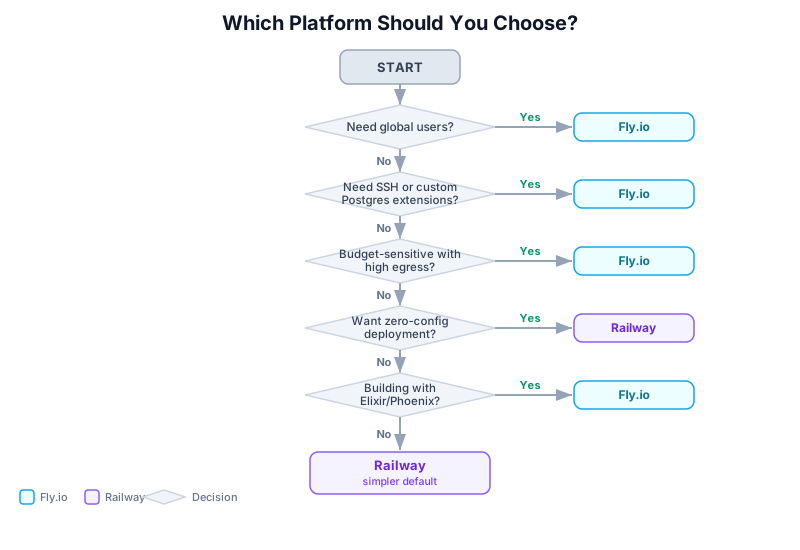
The bottom line: Railway is the better default for most small teams and solo developers who just want to ship. Fly.io is the better choice once you need global reach, infrastructure control, or cost efficiency at scale. Start with Railway if you're unsure. Migrating to Fly.io later is straightforward once you have a Dockerfile.
FAQ
Is Railway cheaper than Fly.io?
No. For always-on production services, Fly.io is typically 30-50% cheaper at equivalent specs. The gap narrowed in 2025 when Railway Metal brought egress down to $0.05/GB (from $0.10/GB), but Fly.io's $0.02/GB (NA/EU) still wins. Railway's advantage is developer experience savings: zero configuration means less engineering time spent on infrastructure.
Does Railway have a free tier in 2026?
Railway offers a Trial plan with a one-time $5 credit, enough for testing but not for running a persistent app. The Hobby plan starts at $5/month with $5 of included usage credits. A real app with a database running 24/7 will cost $15-30/month.
Does Fly.io have a free tier in 2026?
No. Fly.io removed free allowances for new customers in October 2024. New signups get a brief trial (2 VM-hours or 7 days), after which a credit card is required. Legacy users on deprecated plans keep their old free allowances. Neither platform offers a real free tier anymore.
Does Fly.io automatically back up Postgres?
Sort of. Since January 2026, Fly.io enables automatic daily volume snapshots with 5-day retention on new volumes. But these are volume-level snapshots, not logical Postgres backups. For proper point-in-time recovery, you must still configure WAL archiving yourself. Volume snapshots cost $0.08/GB/month (first 10GB free). For a worry-free managed database, consider Supabase or Neon instead.
How does Railway compare to Heroku?
Railway is the closest thing to Heroku that exists today. It supports Procfiles, uses a similar environment variable model, and offers add-on-style database plugins. Most Heroku apps can be deployed to Railway with minimal changes. Railway is cheaper than Heroku's current pricing and has a more modern dashboard, but lacks Heroku's enterprise features and add-on marketplace breadth.
Can Fly.io scale to zero like Railway?
Yes. Fly Machines support scale-to-zero, where VMs are stopped when idle and started on incoming requests. Cold start times are typically 500ms-2s for pre-built images. Autoscaling to zero and back requires careful health check configuration to avoid request timeouts. Railway's scale-to-zero is simpler to configure but has longer cold starts (3-8 seconds). Note that stopped Fly machines still incur rootfs storage costs.
Which is better for a REST API backend, Railway or Fly.io?
For a single-region API with moderate traffic, Railway gets you deployed faster with less configuration. For an API serving global users or handling heavy bandwidth, Fly.io's multi-region anycast routing and cheaper egress make it the better choice. If your API serves less than 100GB/month of egress and your users are in one geography, pick whichever platform's DX you prefer. Railway for simplicity, Fly.io for control.
Is Fly.io good for beginners?
Fly.io has a steeper learning curve than Railway. It requires a CLI tool, a Dockerfile, and a fly.toml configuration file. Health check misconfiguration is the leading cause of failed first deployments. That said, the documentation has improved a lot, and the community forum has detailed troubleshooting threads. If you're comfortable with Docker and the command line, Fly.io is learnable in an afternoon. If you want to skip the infrastructure learning curve entirely, start with Railway.
Which is better for Next.js, Railway or Fly.io?
Railway is easier. Nixpacks auto-detects Next.js and configures the build with zero config. Fly.io requires a Dockerfile and manual configuration of the standalone output mode. That said, for Next.js apps serving global users, Fly.io's multi-region edge deployment can cut latency noticeably. For most teams, Railway's simplicity wins unless you specifically need multi-region.
What are the best alternatives to Railway and Fly.io?
Render is the closest alternative: similar simplicity to Railway with a free tier for static sites and web services. DigitalOcean App Platform offers a managed PaaS with predictable pricing. Coolify is a self-hosted open-source alternative for teams that want full control. For serverless-first apps, Vercel and Netlify remain strong options.
Can I migrate from Railway to Fly.io?
Yes, it's straightforward if you already have a Dockerfile. Export your environment variables from Railway, create a fly.toml configuration, and deploy with flyctl. The main work is configuring health checks, scaling settings, and setting up your own Postgres backups (since Fly Postgres is not managed). Plan for 2-4 hours for a typical web app with a database. Migrating the other direction (Fly.io to Railway) is even easier since Railway auto-detects most setups.
Want to dig deeper? Check out our detailed profiles for Railway and Fly.io, or compare them side by side with pricing, features, and user ratings.